How WisoCare analyzes your skin
WisoCare is a skincare app for iPhone, and it measures your skin on the phone itself. From three front-camera shots, it finds 468 points on your face, measures redness, shine and pigmentation across 5 zones, and makes a visual moisture estimate. The photo is deleted as soon as it's measured and is never uploaded. Then, with your permission, AI explains the numbers in plain words.
How to do a skin analysis at home, step by step
In WisoCare, a skin analysis starts with three quick front-camera shots: straight on, turned right and turned left. The app guides you through each one.
- One-time color calibration. Before your first photo analysis you take a calibration photo, once; it takes about a minute. Wiso uses the whites of your eyes as a white reference to correct the color cast of the room's light.
- Three angles, live pose check. You face forward, then turn right and left, and the app checks your angle in real time.
- Steady capture. The app helps keep the light even while you shoot, so one analysis can be compared with the next.
- Quality check. Each angle is checked for blur, too little or too much light, a strong color cast, whether your face can be found and whether the whites of your eyes are clearly visible. If one fails, you retake just that angle.
The frames are written only to the app's own temporary folder. If you stop halfway, they are kept for at most 30 minutes so you can pick up where you left off, then deleted.
On-device skin analysis: how your phone measures your skin
All of the photo measurement happens on your phone. Wiso finds 468 points on your face, splits your skin into 5 zones (forehead, left cheek, right cheek, nose and chin) and turns the color of each zone into numbers. Because light is different in every photo, it corrects the color against the whites of your eyes. Once the numbers are out, the photo is deleted.
| Measurement | What it looks at in the photo | What it doesn't tell you |
|---|---|---|
| Redness | How far the skin color in a zone leans toward red | Why it's there; it doesn't diagnose |
| Shine | Sharp light reflections on the skin's surface | Whether your skin is oily: moisturizer, sunscreen, sweat and lighting cause shine too. Skipped if you say you're wearing makeup |
| Pigmentation | Skin tone and how even it is across a zone | What a mark is; it never names it |
| Visual moisture estimate | How smooth and even your skin looks in the photo | How hydrated your skin is; it's an estimate from the photo |
The result isn't a numeric grade: you get a level word for your overall state and for each measurement, such as Very Good, Good, Medium, Prominent, High or Low. The results screen moves through Overview, Zones, Tips, Routine and What's next.
You pick your skin tone (Fitzpatrick type) when you set up the app, and the measurement thresholds adapt to it.
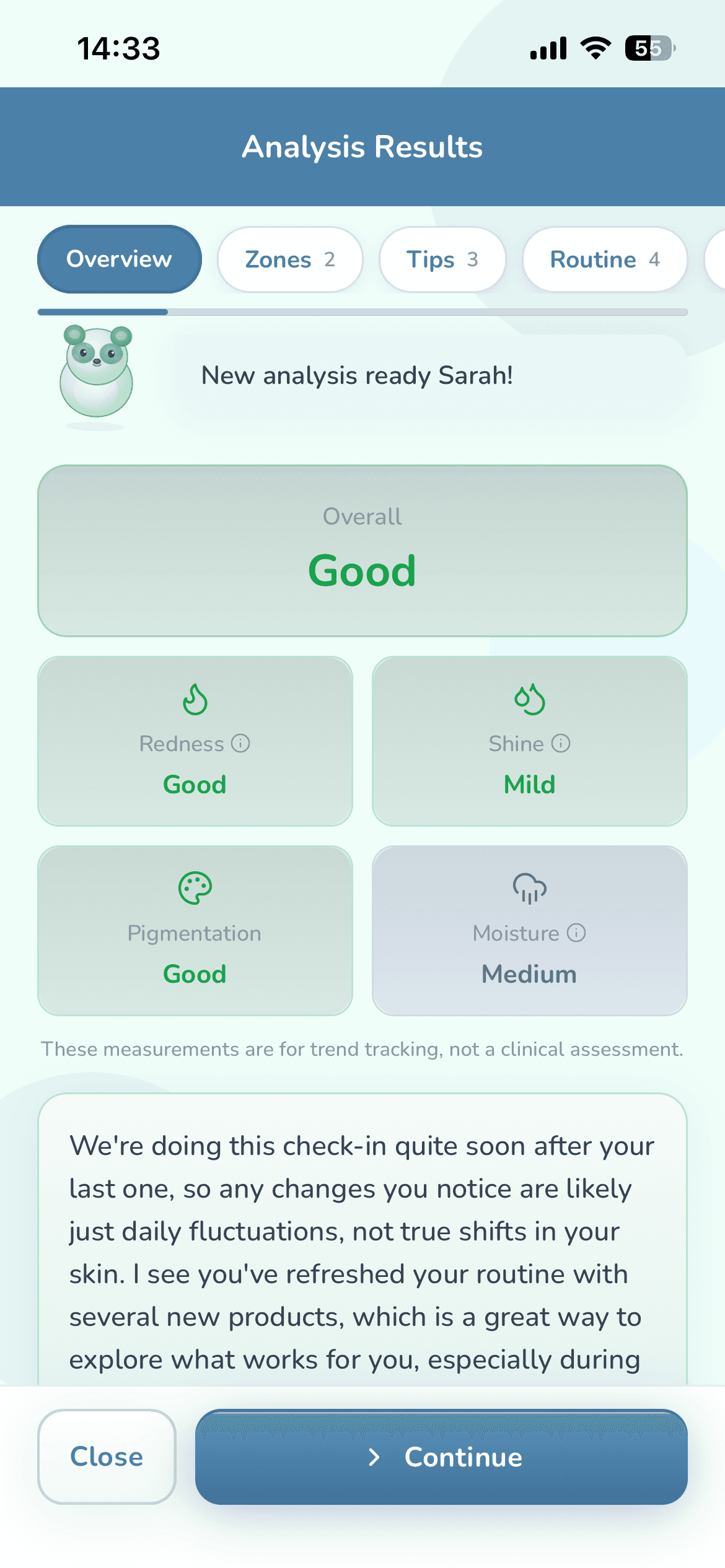
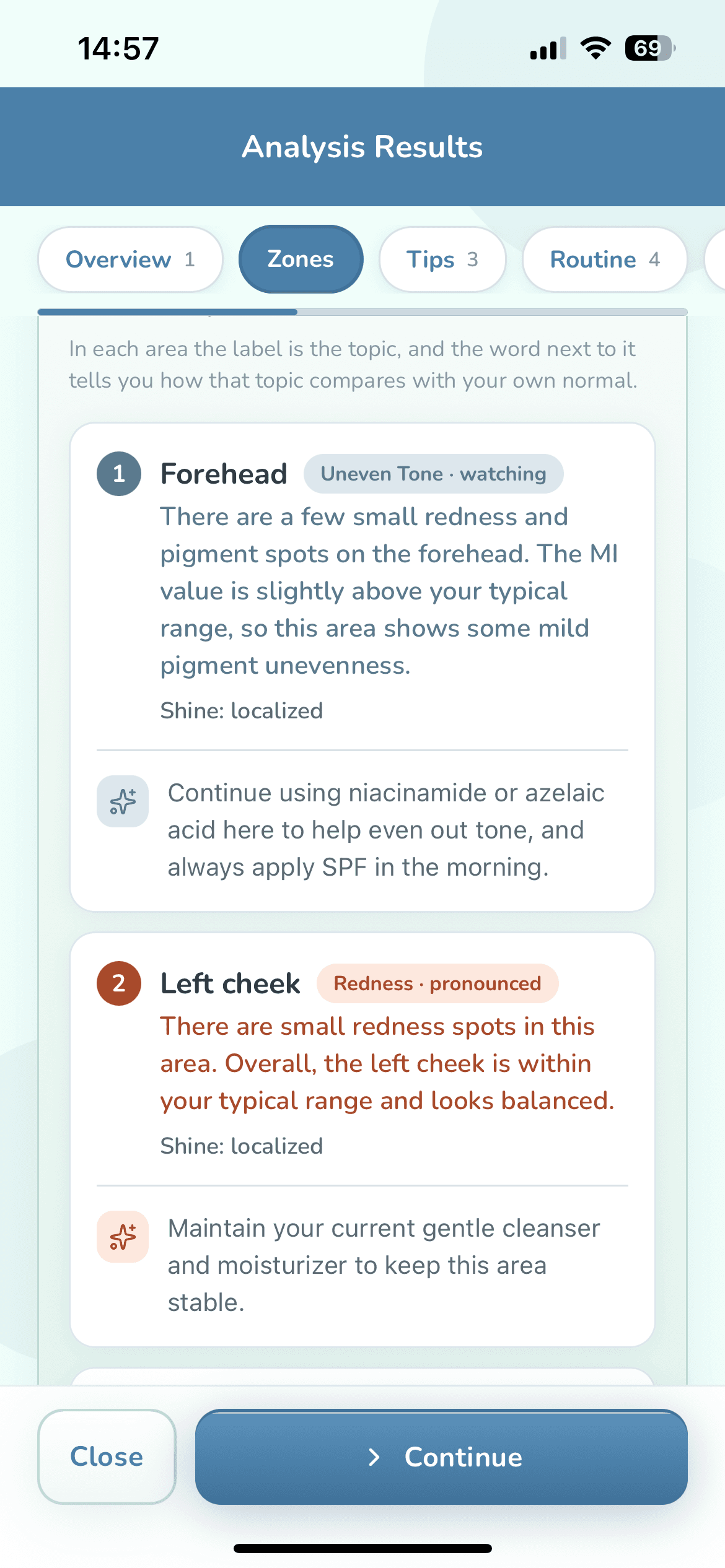
What is your result compared with?
WisoCare compares you with your own starting point, not with other people. The point isn't to judge a single photo but to follow how things change over time.
- Your calibration photo gives you a starting point from your very first analysis.
- As you run more analyses, your own history builds up and the comparison draws on it as well. This comparison runs on your phone and works on the free plan too.
- Your history keeps analysis results (numbers and levels), not photos. Photos are deleted by design, so there is no before-and-after photo gallery.
When the measurement flags something in a zone, the app asks you about it before the explanation is written. If you don't see it on your skin, tap “I do not see this on my skin” and that finding is left out of your result.
What does the AI do in the skin analysis?
Your phone does the measuring, not the cloud AI; the AI's job is to explain what was measured. It takes the numbers your phone produced, explains them in plain words and writes your guidance; it doesn't make the numbers up.
- The level words follow fixed numeric rules we wrote; the AI puts them into plain words and doesn't change the numbers.
- A photo analysis needs an internet connection, because the AI writes the explanation and guidance.
- A photo analysis needs AI permission; the app asks for it separately, before the survey and the camera. You can switch it off whenever you like: you then can't start a new photo analysis, but routine tracking keeps working and Wiso chat falls back to on-device answers.
- If you choose “I just want to track my routine” when you start, no AI permission is needed; see Skincare tracker.
- With Premium, the AI also remembers your history; on the free plan, each analysis is read as if it were your first. On both plans, your measurements are still compared with your own starting point.
What WisoCare's skin analysis doesn't do
WisoCare doesn't diagnose, and it is not a medical device. The analysis is there to guide your skincare routine, not to identify a condition or suggest treatment.
- It doesn't name conditions. It describes what it sees by zone, in words about appearance such as redness, uneven tone or a mark.
- It doesn't give your skin a numeric grade; it describes your overall state and each zone with level words.
- It doesn't compare you with other people.
- A phone camera is no substitute for a dermatologist's equipment.
Measurements are for tracking trends, not a clinical evaluation. If you have a concern about your skin, see a dermatologist.
Where do my photos go?
Nowhere. Your photo is measured on your phone, deleted as soon as the measurement is done and never uploaded to a server; it is deleted even if something goes wrong along the way.
Never sent, under any circumstances
- Photos and videos of your face or of product labels
- The positions of the points on your face
- The skin mask (the map of which parts of the photo are skin)
Your location coordinates aren't sent to us or the AI either; only the city name is used.
What leaves, with your permission
If you allow it, your skin metrics and the information you choose to share in the app (never images) go to the AI so it can write your guidance. That's why we don't say “fully anonymous”: your photo stays on your phone, but the health details you allow are sent too, to personalize your guidance. The full list, and who receives what, is in the Privacy Policy.
You can use your rights under KVKK and GDPR (access, deletion, objection).
What sources is the guidance based on?
WisoCare draws on 25 reference sources and shows them next to your recommendations, clash warnings and product scan results, and on the app's “Sources & References” screen. Most are dermatology sources; the list also includes official sources such as the European Commission's CosIng database and the EU fragrance allergen list, plus Open Beauty Facts, an open product database. None of these organizations endorses WisoCare.
American Academy of Dermatology (AAD)
- Skin care basics
- Order of skin care products
- Retinoid or retinol?
- How to apply sunscreen
- Pregnancy skin care
- Skin care for tweens and teens
DermNet
- Topical retinoids
- Alpha hydroxy acids
- Salicylic acid
- Nicotinamide (niacinamide)
- Azelaic acid
- Benzoyl peroxide
- Emollients and moisturisers
Other organizations and data sources
- U.S. FDA: Sunscreen: How to help protect your skin
- NHS: Sunscreen and sun safety
- MedlinePlus (NIH): Skin conditions
- ACOG: Women’s health
- ACOG: Skin Conditions During Pregnancy (FAQ)
- UKTIS / bumps: Topical retinoids in pregnancy
- NIH PubMed: Menstrual cycle and skin (research)
- NIH PubMed: Topical vitamin C and skin (research)
- EU Regulation 2023/1545: Fragrance allergen labelling
- European Commission: CosIng ingredient database (ingredient functions)
- Open Beauty Facts: product data © contributors, ODbL
The in-app list has one more AAD page, shown under “When to see a dermatologist” and as a source for some active ingredients.
Common questions about skin analysis apps
How accurate are skin analysis apps?
A skin analysis on your phone isn't a clinical assessment: the camera is no substitute for a dermatologist's equipment, and light changes from photo to photo. So WisoCare corrects color against the whites of your eyes, has you retake poor shots and compares you with your own starting point. Read the results as a trend over time, not a one-day verdict.
Is there a skin analysis app that doesn't upload photos?
That's how WisoCare works: it measures your skin from the photo on your phone, deletes the photo as soon as the measurement is done and never uploads it to a server. To write your result, your skin metrics and the information you choose to share in the app (never images) go to the AI with your permission; a photo analysis doesn't run without that permission. The details are in the Privacy Policy.
How often can I run a skin analysis?
On the free plan your first analysis happens right away, and after that you get one analysis every 45 days. Premium gives you unlimited analyses with no waiting, and eligible users can try it free for 3 days. See the current price on the App Store.
Does the analysis work offline?
Not the photo analysis: the measuring happens on your phone, but the AI writes the explanation, so it needs an internet connection. Viewing and checking off your routine, the calendar, reminders and product scanning (the barcode catalog and label reading) work offline; web search for products and the AI clash check need a connection.
Is it on Android?
It's iPhone only for now (iOS 15.1 or later).