A skincare tracker for your routine and your skin's trends
WisoCare is a skincare tracker app for iPhone: you check off your morning and evening routine, get reminders, and see the days you finished as stars on a calendar. No face scan needed; the “I just want to track my routine” path works without analysis or AI permission. Add photo analyses and you can follow how your skin changes, zone by zone, against your own starting point.
Which of the three ways to start is right for you?
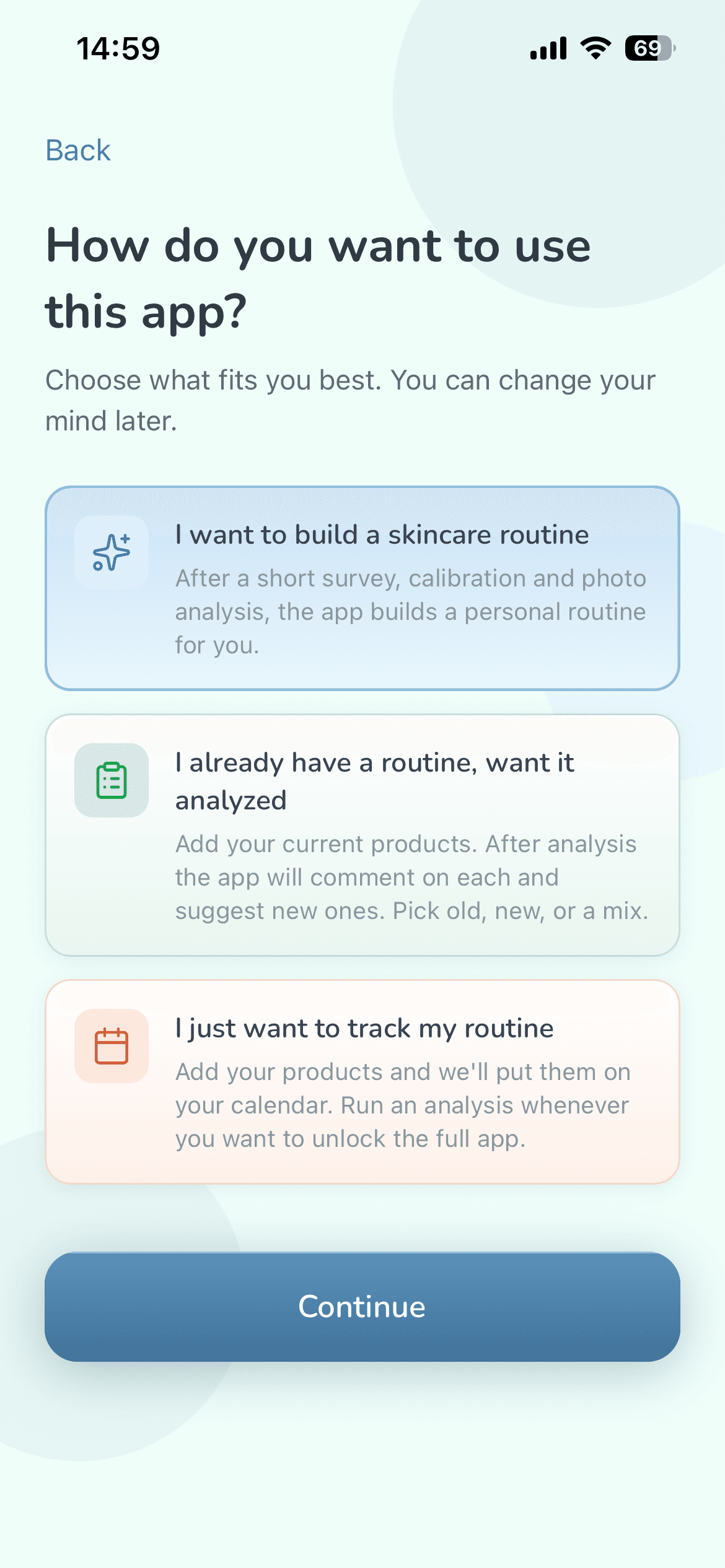
When you first open the app, you pick one of three paths, and you can change your mind later: start with tracking only, for example, and run your first analysis whenever you're ready.
| Option in the app | What happens | Best for |
|---|---|---|
| “I want to build a skincare routine” | After a short survey, a one-time color calibration and a photo analysis, you get a morning and evening routine made for you. | People without a routine, or starting from scratch |
| “I already have a routine, want it analyzed” | You add the products you use. After the analysis, Wiso comments on each one and suggests new ones; you keep your old routine, the new one, or a mix. | People who already have their products and want a second look |
| “I just want to track my routine” | You add your products and they go on your calendar. No photo, no analysis, no AI permission. | People who just want to stay consistent, or would rather not take a face photo |
The first two paths ask for AI permission because the AI writes your guidance; the third doesn't. With your permission, your skin metrics and the information you choose to share in the app (never images) go to the AI to write your guidance. The details are in the Privacy Policy.
Can you track your skincare routine without a face scan?
Yes. If all you want is a skincare routine tracker, pick “I just want to track my routine”: no photo, no color calibration, and no AI permission needed. Setup takes three steps:
- Add the products you use. For each one, pick morning, evening or both, and how often: daily, every other day, weekly, every 2 weeks, or an interval you set.
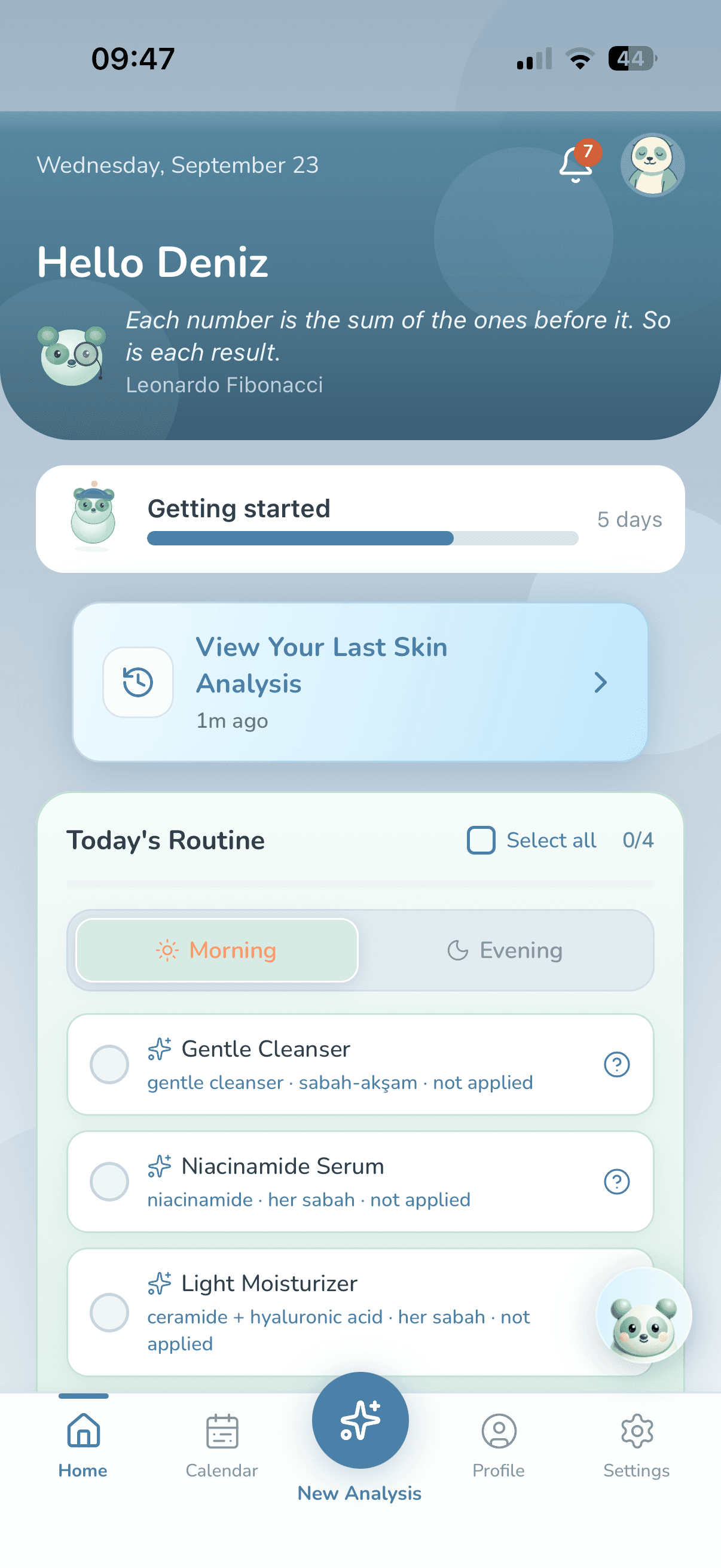
- Your products go on your calendar, and the home screen shows that day's morning and evening steps.
- Tick off each step as you do it. The calendar stars and Wiso's shelf both move with those check-offs.
When Wiso knows what's in your products (for example, you picked one from the catalog, scanned it or typed its active ingredient), it flags ingredients that shouldn't be used together. On the free plan you see that there's a clash; which product, which ingredient and why are shown in Premium.
When you're ready for an analysis, the app walks you through a short survey, calibration and a photo analysis. The products you added are included, and at the end you choose your old routine, the new suggestion, or a mix.
How do daily routine tracking and skincare reminders work?
You tick off your morning and evening steps on the home screen, and you can fill in a day you forgot from the calendar. Here's what makes the tracking easier:
- Catching up: You can check off today and up to 2 days back. Future days can't be ticked off in advance.
- Skincare reminders: One in the morning, one in the evening. They default to noon and 9 p.m.; change both in Settings.
- In your tone, only when needed: Reminders come in whichever of Wiso's four speaking tones you picked. If your routine comes from an analysis and you've already finished that morning's or evening's steps, that day's reminder doesn't go out.
- Streak: The consecutive days you check off at least one step make up your streak. Once it reaches 3 days, the evening reminder mentions it.
- Weekly recap: On Sunday evening, a notification tells you how many days you checked off your routine that week. If a new analysis is available, you get an invitation to run one instead.
- Missed-routine nudge: If you open the app more than 48 hours after your last check-off, Wiso sends you a reminder about an hour later.
- Inbox: Notifications also land in an in-app inbox, so you can read the ones you missed.
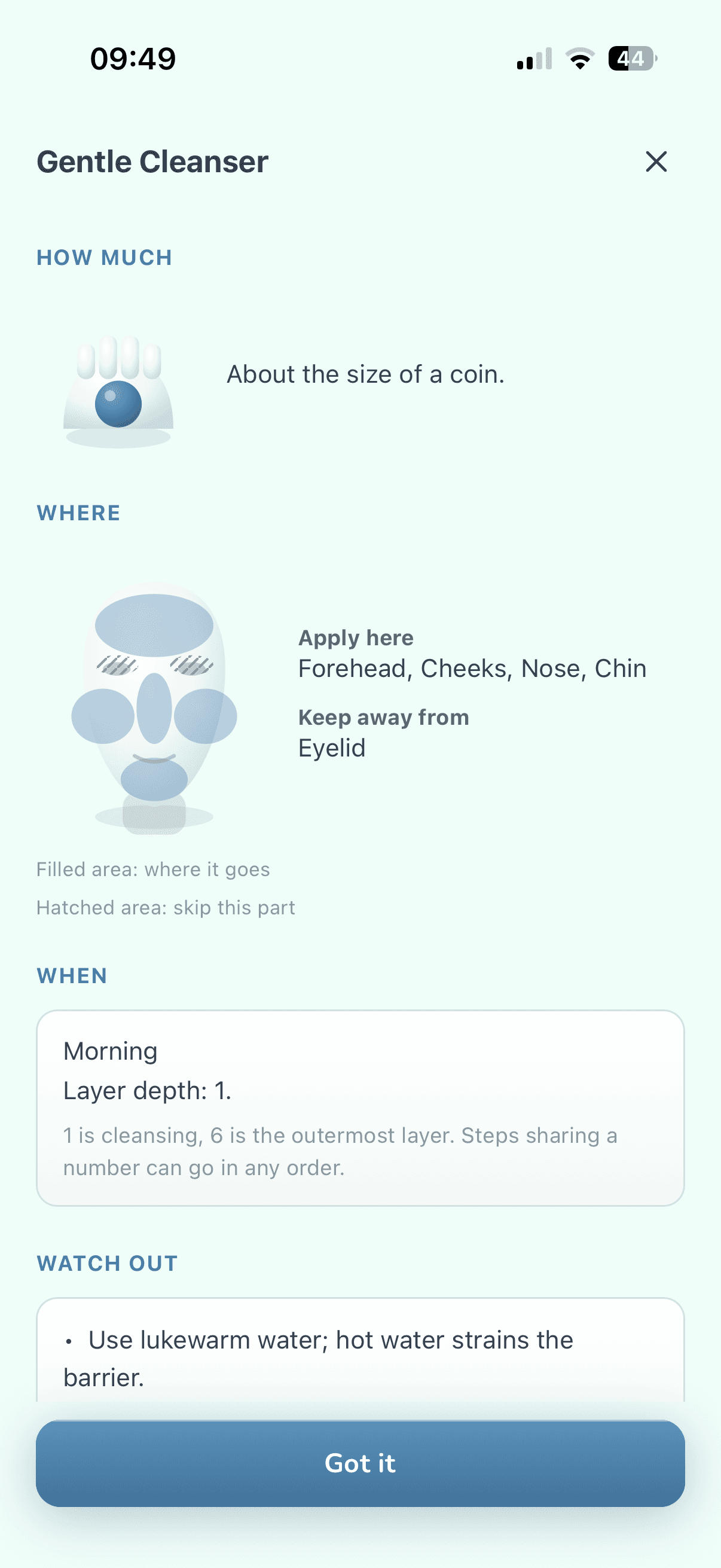
Not sure how to apply a step? The “How to use” guide shows how much to use, where it goes and in what order, with simple drawings. The guide is built from rules, not AI.
What do the colored stars on the calendar mean?
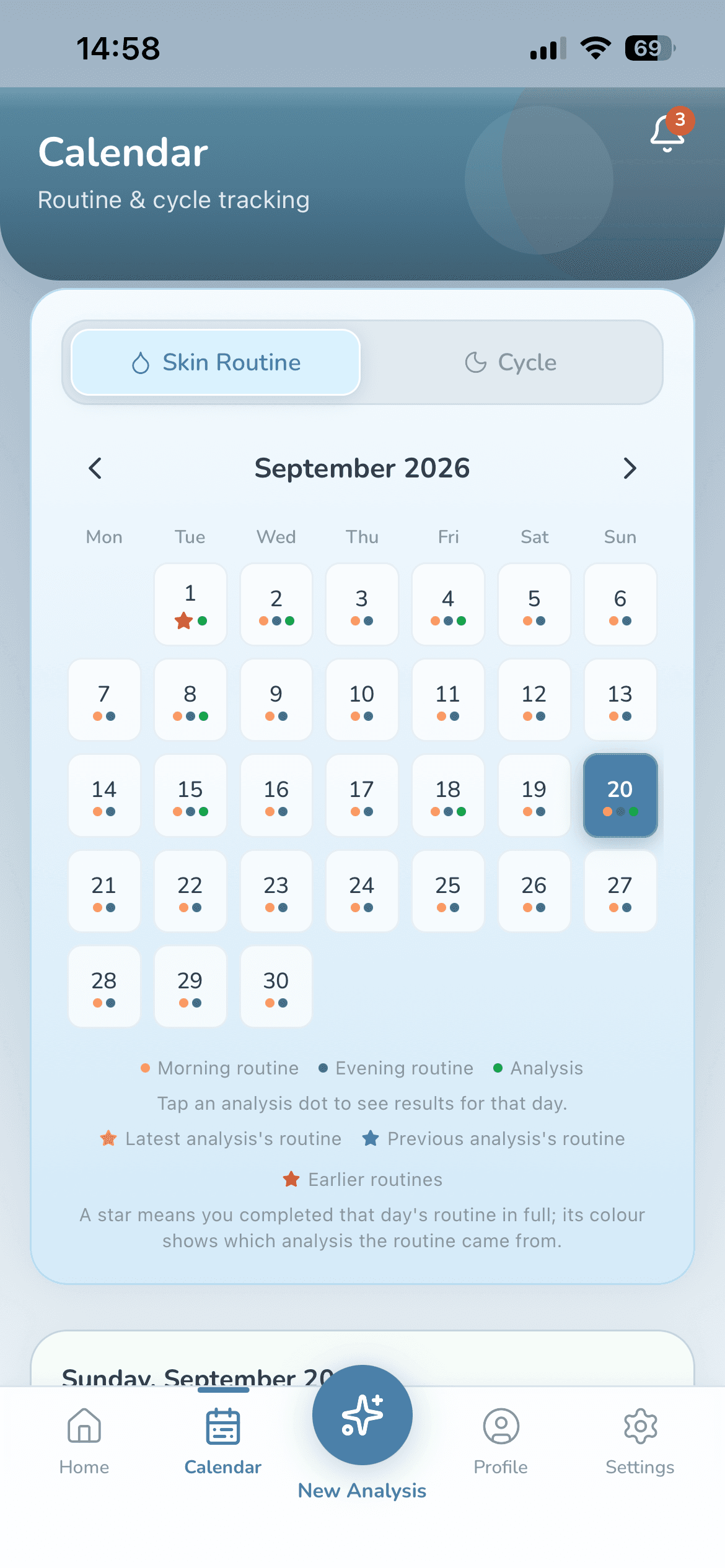
Every day you finish all the morning and evening steps planned for that day earns a star on the calendar, and the star's color tells you which analysis the routine came from.
| Star color | What it means |
|---|---|
| Gold | The routine from your latest analysis |
| Blue | The routine from the analysis before that |
| Salmon | Routines from older analyses, or a routine built from your own products |
When you run a new analysis, past days shift down one color, so you can see at a glance which routine you were on and when.
Analysis days are marked on the calendar too; select one to open its results. In What's next, the last step of a result, you can plan your next analysis: the date shows up on your calendar and you get a reminder when it comes. If you haven't planned one, the free plan reminds you on the day your next analysis unlocks. You can look up to 12 months ahead.
What does Wiso's shelf actually measure?
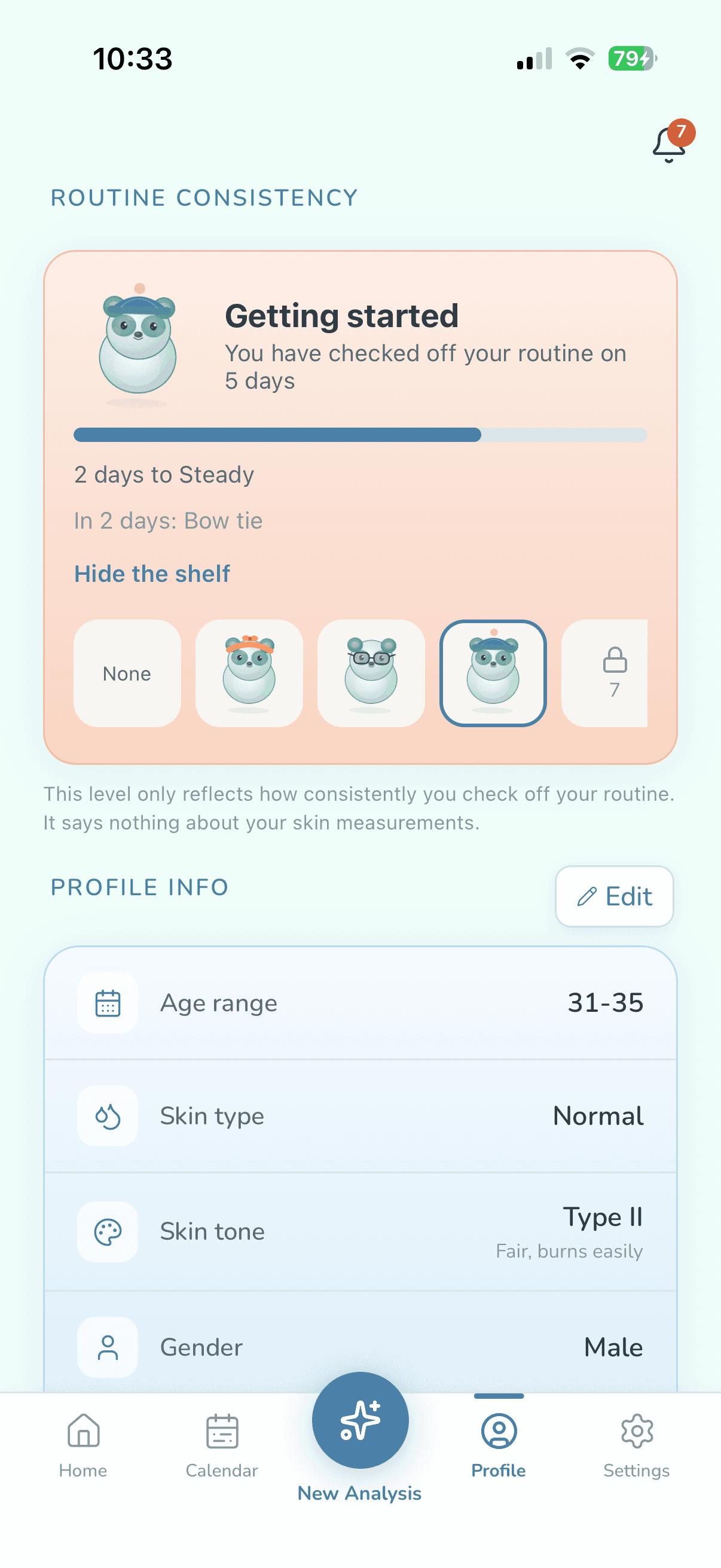
Wiso's shelf measures how consistent you are, not your skin: every day you check off at least one step counts as an active day, and Wiso moves up a tier as those days add up.
| Tier | Active days needed |
|---|---|
| Getting started | 0 |
| Steady | 7 |
| Consistent | 21 |
| Devoted | 45 |
| Unshakeable | 90 |
There are 18 items spread between active day 1 and active day 120, and you can pick any item you've unlocked for Wiso to wear. Your streak resets after a day with no check-offs, but the shelf never goes backward: missing a day doesn't cost you a tier or an item.
Moving up a tier doesn't mean your skin has changed, and the app never links the two.
How do you track changes in your skin over time?
You track your skin through photo analyses. Each one gives a level for redness, shine, pigmentation and a visual moisture estimate, shows the result for five zones (forehead, left cheek, right cheek, nose, chin), and compares you with your own starting point rather than with other people. That's what skin tracking means in WisoCare: it records how your numbers move, it doesn't promise where they'll go.
- Your starting point: The one-time color calibration gives you a starting point from your very first analysis; as you run more analyses, the comparison draws on your own analysis history as well.
- Levels, not grades: Results come as words such as Very Good, Good, Medium or Prominent. For redness, pigmentation and the visual moisture estimate, the AI picks the word by fixed number rules we wrote, and shine is decided on your phone. Your phone calculates the numbers; the AI explains them.
- How often: On the free plan, your first analysis is available right away, then you can run one every 45 days. Premium is unlimited, with no waiting.
- History-aware AI (Premium): Your guidance also takes into account your previous analysis and how consistently you've checked off your routine since then. On the free plan, each analysis is read as if it were your first, though measurements are still compared with your own starting point.
Measurements are for tracking trends, not a clinical evaluation. WisoCare is not a medical device; it does not diagnose or recommend treatment. If you have a concern about your skin, see a dermatologist.
We walk through the measurement step by step on How it works.
Why is there no before-and-after photo gallery?
Because photos aren't kept, by design: your phone does the measuring, and the photo is deleted as soon as it's done and never uploaded to a server. If you stop partway through the three-angle capture, the frames are kept for at most 30 minutes so you can pick up where you left off, then deleted.
What do you keep instead of photos?
- The date of each analysis and the results for all four readings (redness, shine, pigmentation, visual moisture estimate): the numbers and the level words
- Zone-by-zone results for your forehead, both cheeks, nose and chin
- The routine that analysis suggested, plus your check-offs on the calendar
You open past analyses from the analysis history in your Profile, or from analysis days on the calendar. There's no notebook or skin journal in the app; tracking runs on your routine check-offs and your analysis results. If you want your own photos, take them with your iPhone camera; WisoCare doesn't access your photo library.
What happens to your tracking history if you switch phones?
If you've created an account and cloud backup is on (it is by default), your history comes back on your new phone. An account is optional; without one, your data lives only on that phone.
- You can sign up with Apple, Google or email, and cloud backup is on by default once you do.
- The backup covers your profile, analysis history, products, routines and check-off history. It's stored encrypted, server-side, on servers in Europe. Images are never included.
- Your chat history with Wiso isn't part of the backup; it's stored only on your phone.
- Turn the backup off in Settings and the cloud copy is deleted.
There are two ways to delete your data. With an account, “Delete Account” in Settings deletes your account, your backup and the data on your phone. Without one, “Delete all data” in Profile clears the data on your phone. You can use your rights under KVKK and GDPR (access, deletion, objection); what is stored where is in the Privacy Policy.
Skincare tracking: common questions
Can I just track my skincare routine without running an analysis?
Yes. When you start, pick “I just want to track my routine”; no photo, analysis or AI permission is needed. Your products go on your calendar, you check them off each day, and reminders work on this path too.
Is there a before-and-after photo comparison?
No. Photos are deleted as soon as they've been measured, so there's no gallery. Instead, the app keeps the zone-by-zone results of every analysis and compares them with your own starting point.
Will I lose my history if I get a new phone?
Not if you have an account with cloud backup on: your backup is stored encrypted in Europe and comes back when you sign in on the new phone. Without an account, your data stays on the old phone only.
Does it work offline?
Viewing and checking off your routine, the calendar and reminders all work offline, and so do barcode scans for products in the catalog and label reading. A photo analysis needs a connection: the measuring happens on your phone, but the AI writes your guidance.
Is routine tracking free?
Yes. The routine, calendar, reminders, how-to guide, Wiso's shelf and cloud backup are all on the free plan. Premium removes the wait between analyses; see the current price on the App Store. WisoCare is iPhone only for now (iOS 15.1 or later).